1.5. JobServer and TaskServer Administration and Configuration
| download: | pdf |
|---|
1.5.1. JobServer Administration and Configuration
The JobServer is the middle tier of MedeA. It executes the jobs launched in the MedeA graphical user interface (the first tier). Jobs contain one or a series of tasks, created by a single job or a flowchart, that are executed by the TaskServer.
The JobServer can be accessed by selecting View and Control Jobs from the Jobs menu in the MedeA GUI. Also, the JobServer running on the computer with the GUI installed can be accessed from http://localhost:32000. The JobServer page is primarily used for monitoring jobs. Please see the Monitoring a Running Job section for more information. Once on the JobServer page click the Administration tab to change the settings of the JobServer.
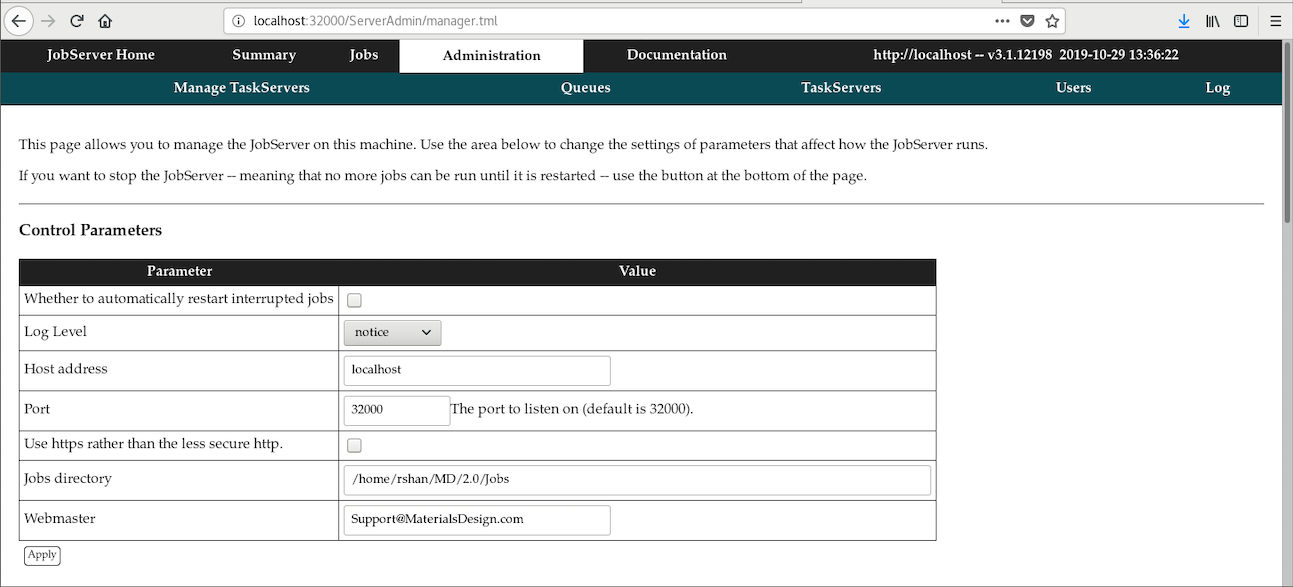
On this page you can set the Log Level. The default level is notice; however, this can be changed to debug if you are having issues configuring the JobServer. The Host address is name of the JobServer and we recommend changing it to localhost. The Port is the port number that the JobServer is running on.
The Jobs directory is directory where all the job files are stored according to their job id number. The default directory of the JobServer is MD/2.0/Jobs. All the input and output files will be stored here after all the tasks have finished, see the next section TaskSever to administrate tasks.
Warning
The port for the JobServer needs to be open in you firewall settings.
The configuration file (JobSever.options) for the JobServer is located in in the MD/2.0/JobServer directory. You can make changes to this file that will directly change the JobServer settings and appear on the JobServer page.
Warning
Incorrect settings in the JobSever.options will cause the JobServer to produce an error upon start and not run.
MedeA stores job information in its MDJobs.db database and in the MD/Databases directory. This database contains all the information displayed on the Jobs page. Jobs can be added to this database using the Import/Reconnect Jobs function in Import/Reconnect Jobs in the Materials Design Maintenance program, see the Using the Materials Design Maintenance Program section for more information.
1.5.2. TaskServer Administration
The TaskServer is the end tier of MedeA that executes all the individual computations needed to complete a job. The MedeA TaskServer gives you several options on how to run your computational tasks, e.g. you can choose to run in serial, in parallel or through a queuing system. You can limit the number of cores used on a specific TaskServer machine. This section describes what options are available to configure how tasks run.
In the following, please have a TaskServer installed that can be contacted through the links JobServer Home >> Administration >> TaskServers or directly through the link http://<taskserver>:23000 where <taskserver> can be localhost, your machine name, or your machine IP address. Both links should open the following page:
Click on the Administration tab in the brown navigation bar to proceed to the page with TaskServer configuration options:
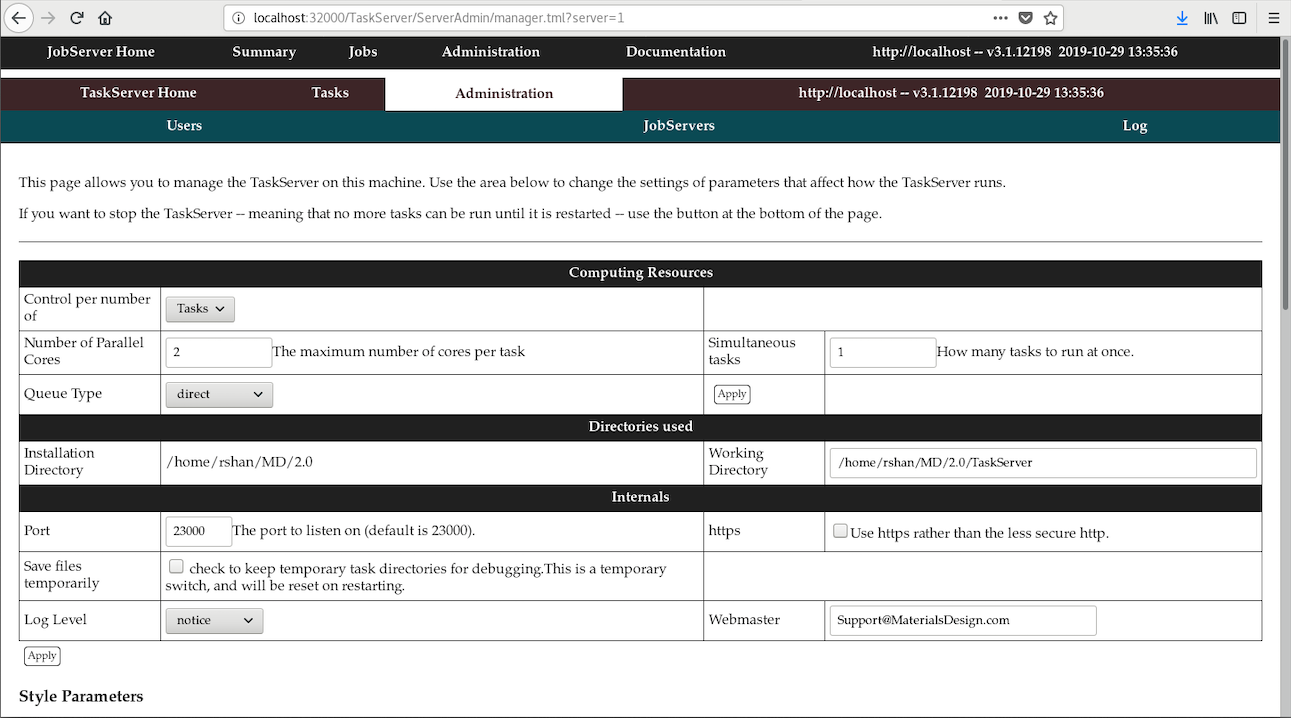
The Control per number of drop-menu has two options:
Cores
Follow-up options are:
- Number of Parallel Cores: The maximum cumulated number of cores to use for all tasks.
- Core limit type: Hard or Soft which allocates no more than available cores (Hard) or if necessary overlad by maximum 50% (Soft).
The Number of Parallel Cores determines how many cores are available for all tasks running on this TaskServer. The default, set during installation, is the number of physical cores (no hyper-threading) on the TaskServer. This is the right value for using mpi or direct mode. If you are using an external queuing system you may increase Number of Parallel Cores to the number of available cores. The Number of Parallel Cores is an upper limit and can be raised at run time in the job submission dialog, which shows the value set for a given queue as the default.
Tasks
Follow-up options are:
- Number of Parallel Cores: The maximum number of cores per task.
- Simultaneous tasks: How many tasks to run at once.
The Queue Type determines how the executables of LAMMPS, GIBBS, VASP, MOPAC, and Gaussian are executed by the TaskServer. The following options are available:
- direct or mpi - uses Intel mpi included in MedeA to run parallel jobs.
- PBS, LSF, GridEngine, etc. - expects a file <templateQUEUE>.tcl in
the directory <md_install_dir>\2.0\TaskServer\Tools\
- PBS (Linux): works with PBS, OpenPBS, or Torque
- LSF (Windows/Unix/Linux)
- GridEngine
- SLURM
- LoadLeveler
- manual: supports running on remote systems with manual transfer
Attention
MedeA does not include any of the above queuing systems. You will need to install, configure, and manage the external queuing systems.
In order to run e.g. with PBS, copy the file templatePBS.tcl to PBS.tcl and set the queue type to PBS in the TaskServer Administration page. The file PBS.tcl provides a number of parameters that can be set to adapt the script to your local environment. The script has to be created for each of the computing codes used, allowing using different queues and other settings for a specific code.
The Working Directory is where the TaskServer writes temporary files. This is a scratch directory as all relevant data are exported back to the JobServer upon completion of tasks.
The Port is the TaskServer port number. It is not recommended to change the Port the TaskServer listens on, unless there is a specific reason for doing so.
The Save files temporarily box allows to keep temporary task directories for debugging problems such as submission to the queueing system. Please note that this is a temporary switch and will be reset upon restarting the TaskServer.
| download: | pdf |
|---|